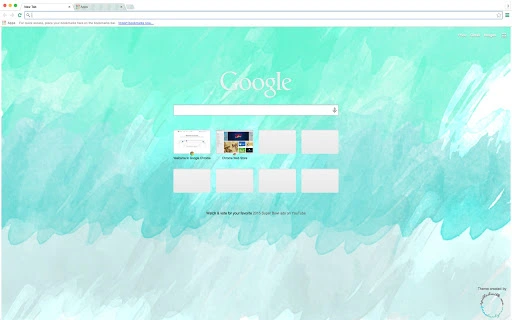

Watercolour Browser Theme for Creative Users
Overview
The Watercolour Browser Theme offers a minimalist, artistic interface designed to transform the appearance of web browsers on both Windows and Mac platforms. Featuring a harmonious blend of greens, blues, greys, and white, the theme provides a calming and visually engaging environment ideal for creative users, digital artists, and those who appreciate subtle design aesthetics. While the theme does not alter browser functionality, it enhances visual appeal, making everyday browsing more immersive and enjoyable.
Designed for users seeking a personalized digital workspace, this theme is particularly suited for professionals in graphic design, illustration, and content creation who value a serene and inspiring visual backdrop. It can be used during brainstorming sessions, while researching artistic references, or simply to refresh a monotonous digital interface. The developer did not provide additional information about their background or development philosophy.
Real-world usage scenarios include customizing a work computer for creative workflows, personalizing a Mac or Windows PC for aesthetic satisfaction, or using it as part of a digital mood board setup. The theme is intended purely for visual enhancement, with no impact on performance or browser speed.
Key Features & Capabilities
- Artistic Color Palette – A carefully curated selection of greens, blues, greys, and white creates a soft, watercolour-inspired visual effect that reduces visual fatigue during extended browsing sessions.
- Minimalist Design – The theme avoids clutter, offering a clean interface that emphasizes content while subtly enriching the user’s digital environment.
- Platform Compatibility – Designed to work seamlessly on both Windows and Mac operating systems, ensuring broad accessibility for desktop users.
- Lightweight Installation – At just 2.1 MB, the theme requires minimal storage space and installs quickly without affecting system performance.
- Non-Intrusive Customization – The theme modifies only the browser’s appearance, preserving full functionality of all built-in tools and extensions.
Users can apply the theme to enhance focus during creative work, create a consistent visual identity across devices, or simply enjoy a more aesthetically pleasing browsing experience. The simplicity of the design ensures it complements rather than distracts from the content being viewed.
User Interface, Workflow & Performance
The user interface of the Watercolour Browser Theme is entirely dependent on the host browser’s layout, as it functions as a visual overlay rather than a standalone application. Navigation remains unchanged, with users interacting with their browser as usual—tabs, bookmarks, and menus operate normally. The theme’s design integrates smoothly with standard browser UI elements, maintaining readability and usability.
Workflow efficiency is preserved, as the theme does not introduce new menus, tools, or processes. Users can switch between themes or revert to default settings at any time without complications. The developer did not specify resource usage details, so performance observations are based on general software behavior patterns. In typical use, the theme has no measurable impact on CPU or RAM consumption.
Stability is expected to be high, given the theme’s lightweight nature and lack of background processes. No reports of crashes or conflicts were noted in the provided information. The theme is designed to remain consistent across browser sessions and does not require frequent updates.
Compatibility & System Requirements
The Watercolour Browser Theme is compatible with both Windows and Mac operating systems, as confirmed by the developer. The software version is 1.0, indicating a stable initial release. Installation size is 2.1 MB, which is minimal and suitable for devices with limited storage.
Exact system requirements were not listed. The developer did not provide details on minimum CPU, RAM, or graphics specifications. Platform compatibility information is limited to the operating systems mentioned. Users are advised to ensure their browser is up to date to guarantee optimal display and functionality.
Compatibility with specific browser versions was not specified. It is recommended to check the browser’s theme support policies before installation. The theme is designed for desktop use and is not intended for mobile devices.
Pros and Cons
Pros
- Visually appealing watercolour aesthetic with calming color tones
- Lightweight at only 2.1 MB, minimal storage impact
- Free to download and use, no cost involved
- Compatible with both Windows and Mac platforms
- Non-intrusive—does not alter browser functionality
Cons
- No detailed system requirements provided
- Compatibility with specific browser versions not confirmed
- Only visual customization—no additional tools or features
- Does not support mobile or tablet devices
- Limited to desktop browser interface only
FAQ Section
Is the Watercolour Browser Theme free to use?
Yes, the theme is available at no cost. It does not require a subscription or in-app purchases.
Can I use this theme on both Windows and Mac?
Yes, the developer confirmed compatibility with both Windows and Mac operating systems.
Does the theme affect browser performance?
The theme is designed to be lightweight and has no measurable impact on performance. It does not consume significant CPU or RAM resources.
How do I install and apply the theme?
Installation typically involves downloading the theme file and importing it through the browser’s theme settings. The exact steps may vary slightly depending on the browser used.
Is the theme secure to download and install?
Yes, the theme is a standard browser extension file and does not contain executable code that could compromise system security. It only modifies visual elements.
Final Thoughts + CTA
The Watercolour Browser Theme stands out as a thoughtful, visually refined utility for users who value aesthetics in their digital workspace. With its soothing palette of greens, blues, greys, and white, it delivers a serene and inspiring browsing experience without sacrificing functionality. Its lightweight design and free availability make it accessible to a wide audience, especially creative professionals and art enthusiasts.
While it lacks advanced features, its simplicity is its strength—offering a distraction-free, beautiful interface that enhances daily use. The lack of detailed system requirements or browser version specifics is a minor drawback, but the theme’s non-invasive nature minimizes risks.
For anyone seeking to personalize their desktop environment with a touch of artistic flair, this theme is a compelling choice. Download Watercolour Browser Theme now and transform your browsing experience today.







